My Yes Bank FASTag failed at a toll plaza today. The barrier didn’t open. What are the most common reasons for a payment failure, and what are the steps to resolve them?
A Yes Bank FASTag payment failure at a toll plaza is frustrating, but it is usually caused by one of a few common issues. Following these resolution steps in order can help you quickly identify and solve the problem.
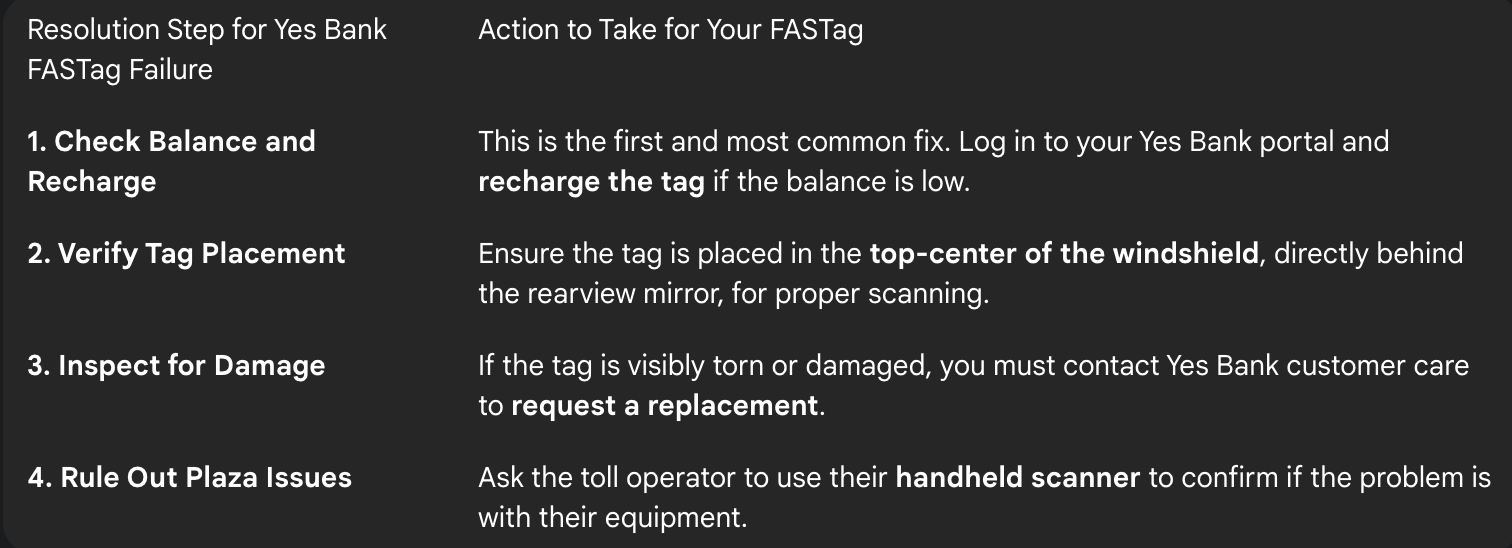
Step 1: Check Your FASTag Balance and Recharge if Needed
My friend’s Yes Bank FASTag was not working, and the toll operator informed him it was “blacklisted.” The first resolution step was for him to check his FASTag balance. He logged into his Yes Bank FASTag portal and saw that his balance had dropped below the minimum required threshold. He immediately recharged the tag, and it was reactivated and ready for use within the hour.
Step 2: Verify the FASTag is Placed Correctly
I was traveling with a colleague whose Yes Bank FASTag was failing to scan at several consecutive tolls. The next step was to check the tag’s placement. I noticed it was stuck on the tinted sunshade area of the windshield. The resolution was to have it carefully re-pasted in the top-center of the windshield, directly behind the rearview mirror.
Step 3: Inspect the Tag for Any Physical Damage
A relative of mine had a crack in her windshield that had also torn her FASTag sticker, and it stopped working completely. If the first two steps don’t solve the problem, you should inspect the tag itself. The only resolution for a physically damaged tag is to get a replacement by contacting Yes Bank FASTag customer care.
Step 4: Rule Out Toll Plaza Equipment Failure
I was once in a situation where my Yes Bank FASTag, which I knew had sufficient balance and was placed correctly, failed to scan. I saw other cars having the same issue. The final step was to rule out an external problem. The resolution was to ask the toll operator to use his handheld RFID scanner, which worked instantly and proved the issue was with the plaza’s equipment.
1 Like
Hey, when my cousin experienced a YES Bank FASTag payment failure during a highway trip, it was stressful because the toll didn’t open even though payment showed “processing.” Thankfully, the issue was resolved once we followed the correct steps. Here’s a simple guide that might help you:
YES Bank FASTag Payment Failure — How to Resolve?
Common Reasons:
• Network or server issues at toll plaza
• FASTag not scanned properly
• Low balance or delayed recharge
• Damaged / expired FASTag
• Wrong vehicle number linked
Steps to Fix the Issue:
1. Check FASTag Balance
Confirm wallet/bank balance from the YES Bank FASTag portal or SMS alerts.
If low, recharge immediately and retry.
2. Verify Transaction Status
Check if the toll amount was deducted:
• SMS notification
• App / Portal transaction history
Take a screenshot for proof.
3. Show Proof at Toll Booth
If deducted but barrier didn’t lift, show the SMS/record.
Toll staff may allow manual clearance.
4. Raise Complaint With YES Bank
Share:
• Vehicle number
• FASTag ID
• Toll name + date + time
• Transaction reference
Customer Support: 1800-1200